Jyve Breach Policy

Edited

This policy explains what happens if a Jyver does not comply with the terms of use of the Jyve platform.

Examples of policy violations include:

  • Canceling a job too late

  • Not showing up for a job you claimed

  • Not completing a claimed job

  • Violating the terms agreed upon between Jyve, our clients, and Jyvers

These guidelines help ensure jobs are completed reliably and fairly for everyone.

Account Suspension or Deactivation Based on Breach Point Balance

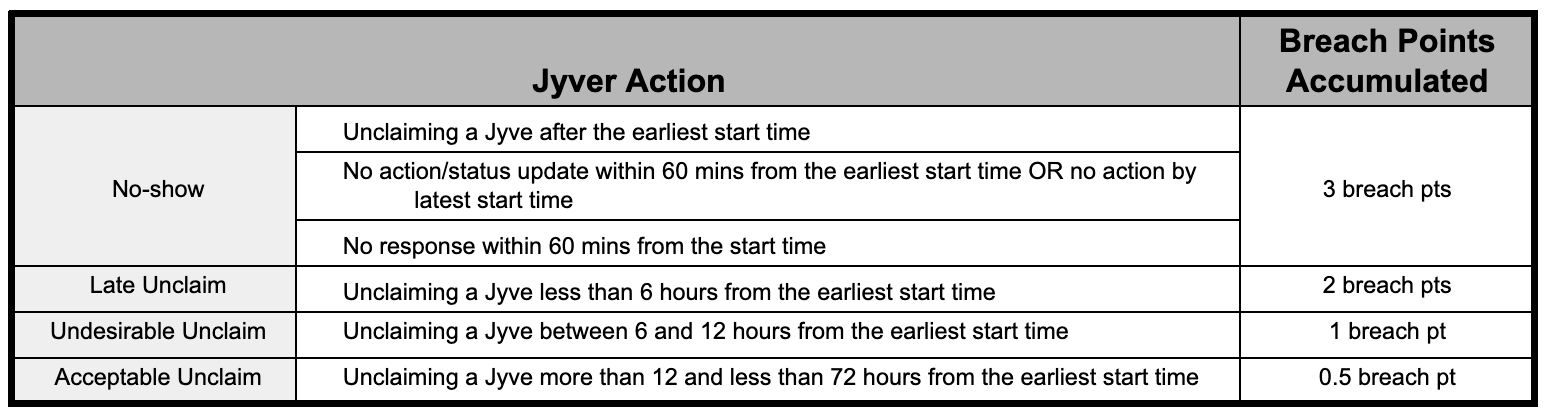
Breach points are added to a Jyver’s account based on the type and severity of the policy violation, as outlined below:

A Jyver’s account may be suspended or deactivated based on the number of breach points accumulated within a rolling 30-day period, as outlined below:

Breach points stay on a Jyver’s account for 30 days. After 30 days, the breach point balance will reset, and the Jyver will start with zero breach points.

Account Suspension or Deactivation Based on Other Circumstances

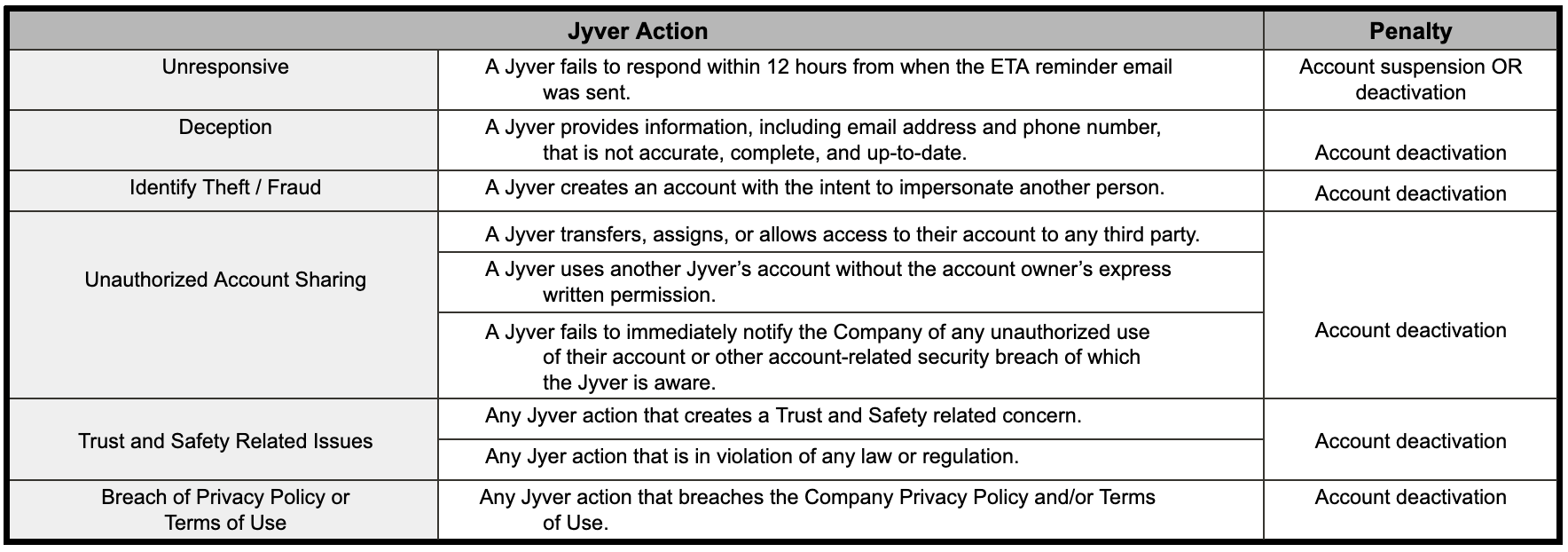
A Jyver’s account may also be suspended or deactivated for other reasons, as outlined below:

Account Suspension

  • If a Jyver’s account is suspended, they will receive an email notification with details about the suspension. During the suspension:

    • Any jobs the Jyver has claimed will be unclaimed.

    • The Jyver will not be able to claim new jobs.

    • The account will remain suspended for 7 days.

  • If you believe your account was suspended by mistake, you can submit an appeal within 3 days of receiving your suspension email. To submit a dispute:

    • Email support@jyve.com

    • Use “Suspension Dispute” as the subject line.

    • Explain why you believe the suspension was incorrect.

    • Include any supporting documents or information that may help with your appeal.

After reviewing your dispute, Jyve may choose to reactivate your account at its discretion.

Account Deactivation

  • If a Jyver’s account is deactivated, they will receive an email notification with details about the deactivation. During deactivation:

    • Any jobs claimed by the Jyver will be unclaimed.

    • The Jyver will no longer be able to claim or complete jobs.

    • The account will remain deactivated unless Jyve decides to reactivate it.

  • If you believe your account was deactivated by mistake, you can submit an appeal within 3 days of receiving your deactivation email. To submit a dispute:

    • Email support@jyve.com

    • Use “Deactivation Dispute” as the subject line.

    • Explain why you believe the deactivation was incorrect.

    • Include any supporting documents or information that may help with your appeal.

After reviewing your dispute, Jyve may choose to reactivate your account at its discretion.

Disputes

  • A Jyver must follow the requirements above when submitting a dispute. Your dispute should include:

    • A clear explanation of why you believe the suspension or deactivation was incorrect.

    • Any supporting documentation, such as screenshots or photos.

    • The names of relevant people you spoke with on-site, if applicable.

    • Any other information or documents that can help support your claim.

  • Disputes submitted on time and with all required information will be reviewed and investigated by the Support/BizDev team.

  • If Jyve approves the dispute, the account may be reactivated. The Jyver will receive an email notification once the account has been reactivated.

Need Help?

If you need assistance, contact Jyve Support through the chat in the Jyve app or submit a request using the link. We're here to help and will be happy to assist you.

Was this article helpful?

Sorry about that! Care to tell us more?

Thanks for the feedback!

There was an issue submitting your feedback
Please check your connection and try again.